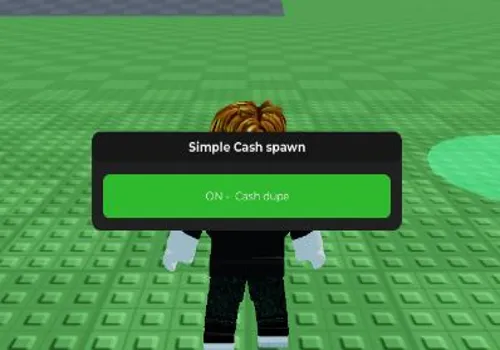
Play and experiment with a sophisticated crowd algorithm in Crowd Playground! Create mesmerizing patterns and interactions. With a cash dupe function, you have unlimited resources to fund your simulations and explore every possibility of crowd dynamics.
Game link: Crowd Playground
Table of Contents
[ads]
local player = game.Players.LocalPlayer
local playerGui = player:WaitForChild("PlayerGui")


local screenGui = Instance.new("ScreenGui")
screenGui.Name = "AdminGamepassUI"
screenGui.ResetOnSpawn = false
screenGui.Parent = playerGui

local frame = Instance.new("Frame")
frame.Size = UDim2.new(0, 280, 0, 80)
frame.Position = UDim2.new(0.5, -140, 0.5, -40)
frame.BackgroundColor3 = Color3.fromRGB(35, 35, 35)
frame.BorderSizePixel = 0
frame.Parent = screenGui


local corner = Instance.new("UICorner")
corner.CornerRadius = UDim.new(0, 8)
corner.Parent = frame


local titleBar = Instance.new("TextLabel")
titleBar.Size = UDim2.new(1, 0, 0, 25)
titleBar.BackgroundColor3 = Color3.fromRGB(25, 25, 25)
titleBar.BorderSizePixel = 0
titleBar.Text = "Simple Cash spawn"
titleBar.TextColor3 = Color3.fromRGB(255, 255, 255)
titleBar.Font = Enum.Font.GothamBold
titleBar.TextSize = 12
titleBar.Parent = frame

local titleCorner = Instance.new("UICorner")
titleCorner.CornerRadius = UDim.new(0, 8)
titleCorner.Parent = titleBar


local toggleButton = Instance.new("TextButton")
toggleButton.Size = UDim2.new(1, -20, 0, 35)
toggleButton.Position = UDim2.new(0, 10, 0, 35)
toggleButton.BackgroundColor3 = Color3.fromRGB(200, 50, 50)
toggleButton.BorderSizePixel = 0
toggleButton.Text = "OFF -  Cash dupe"
toggleButton.TextColor3 = Color3.fromRGB(255, 255, 255)
toggleButton.Font = Enum.Font.Gotham
toggleButton.TextSize = 11
toggleButton.Parent = frame

local btnCorner = Instance.new("UICorner")
btnCorner.CornerRadius = UDim.new(0, 6)
btnCorner.Parent = toggleButton


local enabled = false
local RS = game:GetService("ReplicatedStorage")
local events = RS:WaitForChild("Events")


local function spamRemotes()
    while enabled do
        pcall(function()
            events:WaitForChild("MachineKill"):FireServer("Hammer", 2)
        end)
        pcall(function()
            events:WaitForChild("UseTool"):FireServer("Explode", Vector3.new(-34.012298583984375, 0.15143203735351562, 225.68984985351562), 1)
        end)
        pcall(function()
            events:WaitForChild("MachineKill"):FireServer("Axe", 1)
        end)
        pcall(function()
            events:WaitForChild("MachineKill"):FireServer("Minefield", 1)
        end)
        pcall(function()
            events:WaitForChild("MachineKill"):FireServer("Shredder", 1)
        end)
        pcall(function()
            events:WaitForChild("MachineKill"):FireServer("Crusher", 1)
        end)
        task.wait()
    end
end


toggleButton.MouseButton1Click:Connect(function()
    enabled = not enabled
    if enabled then
        toggleButton.BackgroundColor3 = Color3.fromRGB(50, 200, 50)
        toggleButton.Text = "ON -  Cash dupe"
        coroutine.wrap(spamRemotes)()
    else
        toggleButton.BackgroundColor3 = Color3.fromRGB(200, 50, 50)
        toggleButton.Text = "OFF - Cash dupe"
    end
end)


local dragging, dragInput, dragStart, startPos

local function update(input)
    local delta = input.Position - dragStart
    frame.Position = UDim2.new(startPos.X.Scale, startPos.X.Offset + delta.X, startPos.Y.Scale, startPos.Y.Offset + delta.Y)
end

titleBar.InputBegan:Connect(function(input)
    if input.UserInputType == Enum.UserInputType.MouseButton1 then
        dragging = true
        dragStart = input.Position
        startPos = frame.Position

        input.Changed:Connect(function()
            if input.UserInputState == Enum.UserInputState.End then
                dragging = false
            end
        end)
    end
end)

titleBar.InputChanged:Connect(function(input)
    if input.UserInputType == Enum.UserInputType.MouseMovement then
        dragInput = input
    end
end)

game:GetService("UserInputService").InputChanged:Connect(function(input)
    if input == dragInput and dragging then
        update(input)
    end
end)
Script Features:
- Cash Dupe – Duplicates in-game currency.
- Script developer: iaintlebronthegoat
[ads]
How to use Crowd Playground script?
- Copy the script from the button bellow.
- Run any exploit (We recommend reading the list of the best exploits)
- Install it, insert the script and click execute
- Enjoy it)
Important information:
- All scripts are free.
- All scripts are safe to use.
- We do not have viruses or malware.