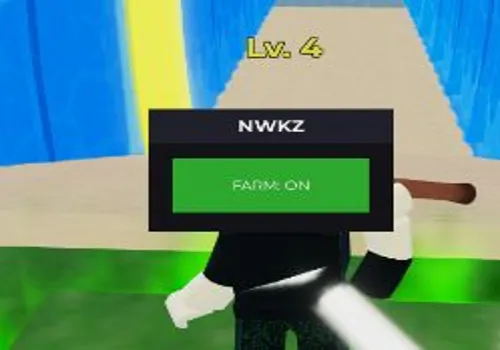
Master the tides in Split the Sea with this powerful OP Autofarm script. Designed for maximum efficiency, this script allows you to simply equip your tool and activate the automation to stay perfectly positioned in the green zone. It handles the charging and splitting for you, letting you effortlessly collect from over 1000 loot variations while you\'re away from your keyboard. Download this script today to stack rare rewards and outpace your friends with zero manual effort.
Game link: Split the Sea
Table of Contents
local Players = game:GetService("Players")
local CoreGui = game:GetService("CoreGui")
local ReplicatedStorage = game:GetService("ReplicatedStorage")
local player = Players.LocalPlayer
local remotes = ReplicatedStorage:WaitForChild("Remotes")
local lootFolder = workspace:WaitForChild("ActiveLoot")

_G.MasterFarm = false

local ScreenGui = Instance.new("ScreenGui")
local MainFrame = Instance.new("Frame")
local Title = Instance.new("TextLabel")
local ToggleBtn = Instance.new("TextButton")

ScreenGui.Name = "NWKZ"
ScreenGui.Parent = CoreGui
ScreenGui.ResetOnSpawn = false

MainFrame.Name = "MainFrame"
MainFrame.Parent = ScreenGui
MainFrame.BackgroundColor3 = Color3.fromRGB(20, 20, 25)
MainFrame.BorderSizePixel = 0
MainFrame.Position = UDim2.new(0.1, 0, 0.4, 0)
MainFrame.Size = UDim2.new(0, 150, 0, 90)
MainFrame.Active = true
MainFrame.Draggable = true

Title.Parent = MainFrame
Title.Size = UDim2.new(1, 0, 0, 25)
Title.BackgroundColor3 = Color3.fromRGB(35, 35, 45)
Title.BorderSizePixel = 0
Title.Text = "NWKZ"
Title.TextColor3 = Color3.fromRGB(255, 255, 255)
Title.Font = Enum.Font.GothamBold
Title.TextSize = 14

ToggleBtn.Parent = MainFrame
ToggleBtn.Position = UDim2.new(0.1, 0, 0.4, 0)
ToggleBtn.Size = UDim2.new(0.8, 0, 0, 40)
ToggleBtn.BackgroundColor3 = Color3.fromRGB(180, 50, 50)
ToggleBtn.Text = "FARM: OFF"
ToggleBtn.TextColor3 = Color3.fromRGB(255, 255, 255)
ToggleBtn.Font = Enum.Font.Gotham
ToggleBtn.TextSize = 11
ToggleBtn.BorderSizePixel = 0

local function GetMyPlot()
    local island = player:GetAttribute("IslandName") or player:GetAttribute("CurrentIsland")
    local plotName = player:GetAttribute("PlotName")
    if island and plotName then
        return workspace.Islands[island].Plots[plotName]
    end
end

task.spawn(function()
    while true do
        if _G.MasterFarm then
            local char = player.Character
            local root = char and char:FindFirstChild("HumanoidRootPart")
            if root then
                for _, item in pairs(lootFolder:GetChildren()) do
                    if item:GetAttribute("PickupType") == "Interact" then
                        remotes.InteractRequest:FireServer(item.Name)
                    else
                        local p = item:IsA("Model") and (item.PrimaryPart or item:FindFirstChildWhichIsA("BasePart")) or item
                        if p and p:IsA("BasePart") then p.CFrame = root.CFrame end
                    end
                end
            end
        end
        task.wait(0.3)
    end
end)

task.spawn(function()
    local myPlot = GetMyPlot()
    while true do
        if _G.MasterFarm and myPlot then
            if myPlot:GetAttribute("PlotBusy") ~= true then
                remotes.SplitRequest:FireServer(1, true)
                task.wait(3.5)
                remotes.SellRequest:FireServer({Mode = "SellAll"})
            end
        end
        task.wait(0.5)
    end
end)

ToggleBtn.MouseButton1Click:Connect(function()
    _G.MasterFarm = not _G.MasterFarm
    ToggleBtn.Text = _G.MasterFarm and "FARM: ON" or "FARM: OFF"
    ToggleBtn.BackgroundColor3 = _G.MasterFarm and Color3.fromRGB(50, 180, 50) or Color3.fromRGB(180, 50, 50)
end)
Script Features:
- Autofarm: Automatically equips your tool and stays in the green zone to collect loot without manual effort.
- Script developer: NWKZ
How to use Split the Sea script?
- Copy the script from the button bellow.
- Run any exploit (We recommend reading the list of the best exploits)
- Install it, insert the script and click execute
- Enjoy it)
Important information:
- All scripts are free.
- All scripts are safe to use.
- We do not have viruses or malware.
Leave a Comment