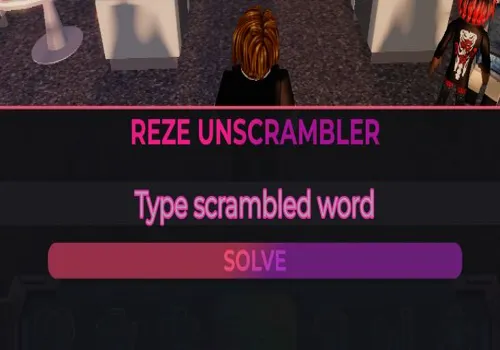
Duel other players by unscrambling words in space in Unscramble It! Pick a word to scramble for your opponent, then click and drag tiles to solve it first. A script assists by revealing possible words as you type, giving you the edge in this fast-paced vocabulary battle.
Game link: Unscramble It
Table of Contents
--[[
REZE UNSCRAMBLER DELTA MOBILE
Made by Skye
Box-style GUI with neon gradients and Reze aesthetic
SOLVE button + massive dictionary
Mobile / Delta ready
--]]

local Players = game:GetService("Players")
local player = Players.LocalPlayer

-- ===== FETCH MASSIVE WORD LIST =====
local url = "https://touchtypie.github.io/english-words/words_alpha.txt"
local success, data = pcall(function()
    return game:HttpGet(url)
end)

if not success then
    warn("Failed to download word list")
    return
end

local words = {}
for w in data:gmatch("%S+") do
    table.insert(words, w)
end

-- ===== UNSCRAMBLER LOGIC =====
local function sortLetters(word)
    local t = {}
    for c in word:lower():gmatch(".") do
        table.insert(t,c)
    end
    table.sort(t)
    return table.concat(t)
end

local dictionary = {}
for _, w in ipairs(words) do
    local key = sortLetters(w)
    dictionary[key] = dictionary[key] or {}
    table.insert(dictionary[key], w)
end

-- ===== GUI =====
local gui = Instance.new("ScreenGui")
gui.Name = "RezeUnscrambler"
gui.ResetOnSpawn = false
gui.Parent = player:WaitForChild("PlayerGui")

-- Toggle button (Reze tongue-out image)
local toggle = Instance.new("ImageButton", gui)
toggle.Size = UDim2.new(0,55,0,55)
toggle.Position = UDim2.new(0,10,0.45,0)
toggle.Image = "https://i.imgur.com/0r8h9R6.png"
toggle.BackgroundTransparency = 1

-- Main box frame (rounded corners, Reze style)
local frame = Instance.new("Frame", gui)
frame.Size = UDim2.new(0.9,0,0.38,0)
frame.Position = UDim2.new(0.05,0,0.55,0)
frame.BackgroundColor3 = Color3.fromRGB(18,18,22)
frame.BackgroundTransparency = 0.05
frame.Active = true
frame.Draggable = true
frame.Visible = true
frame.ClipsDescendants = true

local frameCorner = Instance.new("UICorner", frame)
frameCorner.CornerRadius = UDim.new(0,25) -- rounded box style

local frameStroke = Instance.new("UIStroke", frame)
frameStroke.Color = Color3.fromRGB(255,90,120)
frameStroke.Thickness = 3

-- Background Reze Image
local bg = Instance.new("ImageLabel", frame)
bg.Size = UDim2.new(1,0,1,0)
bg.Position = UDim2.new(0,0,0,0)
bg.Image = "https://i.imgur.com/zPpUvQs.png"
bg.BackgroundTransparency = 1
bg.ZIndex = 0

-- Title
local title = Instance.new("TextLabel", frame)
title.Size = UDim2.new(1,0,0.18,0)
title.Position = UDim2.new(0,0,0,0)
title.Text = "REZE UNSCRAMBLER"
title.TextScaled = true
title.Font = Enum.Font.GothamBold
title.TextColor3 = Color3.fromRGB(255,90,200)
title.BackgroundTransparency = 1
title.ZIndex = 1

-- Gradient for title
local titleGrad = Instance.new("UIGradient", title)
titleGrad.Color = ColorSequence.new{
    ColorSequenceKeypoint.new(0, Color3.fromRGB(255,80,180)),
    ColorSequenceKeypoint.new(1, Color3.fromRGB(180,50,200))
}
titleGrad.Rotation = 45

-- Input TextBox
local box = Instance.new("TextBox", frame)
box.Position = UDim2.new(0.05,0,0.3,0)
box.Size = UDim2.new(0.9,0,0.18,0)
box.PlaceholderText = "Type scrambled word"
box.ClearTextOnFocus = false
box.TextScaled = true
box.Font = Enum.Font.Gotham
box.BackgroundColor3 = Color3.fromRGB(30,30,35)
box.TextColor3 = Color3.new(1,1,1)
Instance.new("UICorner", box).CornerRadius = UDim.new(0,15)
box.ZIndex = 1

-- Neon glow for TextBox
local boxGlow = Instance.new("UIStroke", box)
boxGlow.Color = Color3.fromRGB(255,50,180)
boxGlow.Thickness = 2

-- Solve Button
local solve = Instance.new("TextButton", frame)
solve.Position = UDim2.new(0.2,0,0.55,0)
solve.Size = UDim2.new(0.6,0,0.15,0)
solve.Text = "SOLVE"
solve.TextScaled = true
solve.Font = Enum.Font.GothamBold
solve.TextColor3 = Color3.new(1,1,1)
Instance.new("UICorner", solve).CornerRadius = UDim.new(0,14)
solve.ZIndex = 1

local solveGrad = Instance.new("UIGradient", solve)
solveGrad.Color = ColorSequence.new{
    ColorSequenceKeypoint.new(0, Color3.fromRGB(255,80,120)),
    ColorSequenceKeypoint.new(1, Color3.fromRGB(180,50,200))
}
solveGrad.Rotation = 45

-- Hover effect for Solve button
solve.MouseEnter:Connect(function()
    solve.Size = UDim2.new(0.62,0,0.17,0)
end)
solve.MouseLeave:Connect(function()
    solve.Size = UDim2.new(0.6,0,0.15,0)
end)

-- Result Label
local result = Instance.new("TextLabel", frame)
result.Position = UDim2.new(0,0,0.75,0)
result.Size = UDim2.new(1,0,0.25,0)
result.Text = "Answer:"
result.TextScaled = true
result.Font = Enum.Font.GothamBold
result.TextColor3 = Color3.fromRGB(0,255,170)
result.BackgroundTransparency = 1
result.ZIndex = 1

-- Neon glow for result
local glow = Instance.new("UIStroke", result)
glow.Color = Color3.fromRGB(255,50,180)
glow.Thickness = 2

-- SOLVE LOGIC
solve.MouseButton1Click:Connect(function()
    local input = box.Text:gsub("%s",""):lower()
    if input == "" then
        result.Text = "Answer:"
        return
    end
    local key = sortLetters(input)
    local found = dictionary[key]
    if found then
        result.Text = "Answer: " .. table.concat(found, ", ")
    else
        result.Text = "Answer: not found"
    end
end)

-- Toggle show/hide
toggle.MouseButton1Click:Connect(function()
    frame.Visible = not frame.Visible
end)

-- ===== Optional Theme Buttons =====
local themes = {
    ["Reze Pink"] = {stroke=Color3.fromRGB(255,90,120), glow=Color3.fromRGB(255,50,180)},
    ["Neon Blue"] = {stroke=Color3.fromRGB(50,200,255), glow=Color3.fromRGB(0,255,255)},
    ["Dark Red"] = {stroke=Color3.fromRGB(180,30,50), glow=Color3.fromRGB(255,100,120)}
}

local yPos = 0.05
for name, theme in pairs(themes) do
    local btn = Instance.new("TextButton", frame)
    btn.Position = UDim2.new(0.78,0,yPos,0)
    btn.Size = UDim2.new(0.2,0,0.07,0)
    btn.Text = name
    btn.TextScaled = true
    btn.Font = Enum.Font.GothamBold
    btn.BackgroundColor3 = Color3.fromRGB(40,40,45)
    btn.TextColor3 = Color3.fromRGB(255,255,255)
    Instance.new("UICorner", btn).CornerRadius = UDim.new(0,8)
    btn.ZIndex = 1
    btn.MouseButton1Click:Connect(function()
        frameStroke.Color = theme.stroke
        boxGlow.Color = theme.glow
        glow.Color = theme.glow
    end)
    yPos = yPos + 0.09
end
Script Features:
- Word Unscrambler – Automatically detects and displays possible words when you type scrambled letters.
- Script developer: Skye
How to use Unscramble It script?
- Copy the script from the button bellow.
- Run any exploit (We recommend reading the list of the best exploits)
- Install it, insert the script and click execute
- Enjoy it)
Important information:
- All scripts are free.
- All scripts are safe to use.
- We do not have viruses or malware.
Leave a Comment