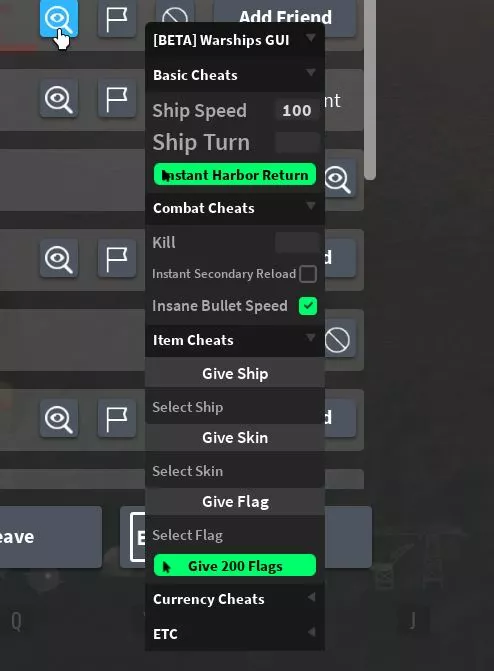
Functions: Speed changer & more

Installation guide:Copy the script from the button below.Run any Injector (We recommend KRNL Injector)Install it, insert the script and click executeEnjoy it)
Thank you for using our website
Your script:
					--[[
   Made by Serafall Leviathan#9956
   Ship and Skin Grabber by Eternal#9542
   AwardEventPlayer Found By Eternal#9542
   UI Library from Aika
]]--
-- GUI Variables
local Library = loadstring(game:HttpGet(('https://raw.githubusercontent.com/AikaV3rm/UiLib/master/Lib.lua')))()
local Window = Library:CreateWindow("[BETA] Warships GUI")
local basicFolder = Window:CreateFolder("Basic Cheats")
local combatFolder = Window:CreateFolder("Combat Cheats")
local itemFolder = Window:CreateFolder("Item Cheats")
local currencyFolder = Window:CreateFolder("Currency Cheats")
local etcFolder = Window:CreateFolder("ETC")
-- Script Variables
local serverEvents = game:GetService("ReplicatedStorage").ServerEvents
local Player = game.Players.LocalPlayer
local securityKey = nil
local shipList = {}
local skinList = {}
local flagList = {"CoinBoostFlag", "ShipSpeedFlag", "ResearchBoostFlag", "HealthBoostFlag", "WrenFlag"}
-- We need to get the security key then store it because we cant use
-- SK:InvokeServer() multiple times or we get kicked
while securityKey == nil do
   if game.Workspace:FindFirstChild("SecurityKey") then
       securityKey = game.Workspace.SecurityKey.Value
       print("Key: " .. securityKey)
   else
       local Key = Instance.new("NumberValue")
       Key.Name = "SecurityKey"
       Key.Parent = game.Workspace
       securityKey = serverEvents.SK:InvokeServer()
       Key.Value = securityKey
       print("First Launch Key: " .. securityKey)
   end
end
-- Grab list of ships
for i,v in pairs(game:GetService("ReplicatedStorage").HarborShips:GetChildren()) do
   if v ~= game.Players.LocalPlayer then
       table.insert(shipList, v.Name)
   end
end
-- Grab list of skins
for i,v in pairs(game:GetService("Lighting").Skins:GetChildren()) do
   if v ~= game.Players.LocalPlayer then
       table.insert(skinList, v.Name)
   end
end
basicFolder:Box("Ship Speed","number",function(value)
   serverEvents.UpdateShipSpeed:FireServer( value, securityKey )
end)
basicFolder:Box("Ship Turn","number",function(value)
   serverEvents.UpdateShipTurn:FireServer( value, securityKey )
end)
basicFolder:Button("Instant Harbor Return",function()
   serverEvents.TriggerHarbourReturn:FireServer()
end)
-- Just my kill script i made
combatFolder:Box("Kill","string",function(value)
if (value == "all") then
   local children = game.Workspace.CombatZone.Ships:GetChildren()
   for count = 1, 10 do
       for i, child in ipairs(children) do
           serverEvents.FireProjectile:FireServer(
               game:GetService("Workspace").CombatZone.Ships[Player.Name],
               game:GetService("Workspace").CombatZone.Ships[Player.Name].Gun.Barrel.BulletPos,
               Vector3.new(child.Base.Position.X, child.Base.Position.Y, child.Base.Position.Z), -- origin point
               Vector3.new(-15, 0, -15),
               500,
               "Primary",
               securityKey
           )
           wait(.01)
       end
   end
else
   if (value ~= "all") then
       local playerpos = game.Workspace.CombatZone.Ships[value].Base.Position
       for count = 1, 10 do
           serverEvents.FireProjectile:FireServer(
               game:GetService("Workspace").CombatZone.Ships[Player.Name],
               game:GetService("Workspace").CombatZone.Ships[Player.Name].Gun.Barrel.BulletPos,
               Vector3.new(playerpos.X, playerpos.Y, playerpos.Z),
               Vector3.new(-15, 0, -15),
               500,
               "Primary",
               securityKey
           )
           wait(.01)
       end
   end
end
end)
local reloadBackup = nil
combatFolder:Toggle("Instant Secondary Reload",function(bool)
   shared.toggle = bool
   if (bool == true) then
       reloadBackup = game.Workspace.CombatZone.Ships[Player.Name].Config.SecondaryReloadSpeed.Value
       game.Workspace.CombatZone.Ships[Player.Name].Config.SecondaryReloadSpeed.Value = 0.0001
   else
       game.Workspace.CombatZone.Ships[Player.Name].Config.SecondaryReloadSpeed.Value = reloadBackup
   end
end)
local speedBackup = nil
combatFolder:Toggle("Insane Bullet Speed",function(bool)
   shared.toggle = bool
   if (bool == true) then
       speedBackup = game.Workspace.CombatZone.Ships[Player.Name].BulletSpeed.Value
       game.Workspace.CombatZone.Ships[Player.Name].BulletSpeed.Value = 100000
   else
       game.Workspace.CombatZone.Ships[Player.Name].BulletSpeed.Value = speedBackup
   end
end)
itemFolder:Label("Give Ship",{
   TextSize = 20;
   TextColor = Color3.fromRGB(255,255,255);
   BgColor = Color3.fromRGB(60,60,60);
})
itemFolder:Dropdown("Select Ship",shipList,true,function(item)
   serverEvents.AwardEventPlayer:InvokeServer("Ship", item)
end)
itemFolder:Label("Give Skin",{
   TextSize = 20;
   TextColor = Color3.fromRGB(255,255,255);
   BgColor = Color3.fromRGB(60,60,60);
})
itemFolder:Dropdown("Select Skin",skinList,true,function(item)
   serverEvents.AwardEventPlayer:InvokeServer("Skin", item)
end)
itemFolder:Label("Give Flag",{
   TextSize = 20;
   TextColor = Color3.fromRGB(255,255,255);
   BgColor = Color3.fromRGB(60,60,60);
})
itemFolder:Dropdown("Select Flag",flagList,true,function(item)
   ServerEvents.BuyFlag:InvokeServer(item, 0)
end)
itemFolder:Button("Give 200 Flags",function()
   for i, flag in ipairs(flagList) do
       for count = 1, 200 do
           serverEvents.BuyFlag:InvokeServer(flag, 0)
       end
   end
end)
currencyFolder:Box("Tokens","number",function(value)
   serverEvents.AwardEventPlayer:InvokeServer("Token", value)
end)
currencyFolder:Box("Coins","number",function(value)
   serverEvents.AwardEventPlayer:InvokeServer("Coins", value)
end)
currencyFolder:Box("Research","number",function(value)
   serverEvents.AwardEventPlayer:InvokeServer("Research", value)
end)
etcFolder:DestroyGui()
Leave a Comment